 Owncast now supports custom plugins.
 Enable Chat authentication
By default there is no requirement to authenticate when using Owncast chat. However, some prefer to authenticate themselves to verify their identity to others, and to continue using the same chat identity across multiple devices and browsers. This is especially helpful for those with moderator privileges.
Server operators can also turn on Require Authentication in the admin under Configuration > Chat.
When it is on, anyone who has not authenticated, other than moderators, is rejected when they try to send
a chat message.
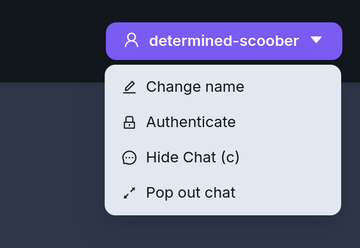
You can access the authentication options via the chat dropdown menu in the upper right of the page.
- FediAuth
- IndieAuth
Fediverse Authentication (FediAuth)
Using your Fediverse account you can be sent a one time use six digit code to verify your identity and authenticate yourself with Owncast chat. Fediverse support must be enabled on the Owncast server for this feature to be available.
The code arrives as a direct message to your account. If you do not receive this message make sure you can accept direct messages.
The code is valid for 10 minutes. After that you will need to request a new one.
IndieAuth
IndieAuth is an open standard decentralized authentication protocol that enables services to verify the identity of a user represented by a URL. This means anybody that has an existing URL that supports IndieAuth can use it to authenticate with Owncast chat.
Visit IndieAuth.net to learn more.
Owncast is an IndieAuth server
If you run an Owncast server you can use it as your IndieAuth provider by entering the URL of your server. Authenticating this way verifies you as the admin of that Owncast server.
Improve this page
See something missing or incorrect? Edit this page and improve the documentation for everyone.

Related Documents
- ChatHow to use the Owncast chat features.
- AuthenticationBuild a plugin that makes viewers sign in with OAuth, a password, or any HTTP-based provider before they can reach protected Owncast resources.
- Chat moderationAdd moderators, remove messages and users from your chat.
- Chat pluginsBuild chat bots, moderation tools, and message filters for Owncast plugins using chat handlers and owncast.chat APIs.
- Chat is offline
- Upload Custom emojiAdd your own custom emoji for use in chat.