 Owncast now supports custom plugins.
 Chat plugin commands
Declare a command table for commands such as !uptime or !so. Command tables
support aliases, moderator gates, per-user cooldowns, parsed arguments, and
automatic !help listings. See chat basics for the chat
message payload, sending messages, and filters.
Register a command table
A command table provides:
- a configurable command prefix, with
!as the default - per-command
description,usage, andaliases - per-user cooldowns
- moderator-only gating based on the sender's scopes
- argument parsing
- an automatic
!helplisting
- JavaScript
- Python
const { definePlugin } = require('@owncast/plugin-sdk');

module.exports = definePlugin({
  commandPrefix: '!', // optional
  commands: {
    uptime: {
      description: "How long we've been live",
      run: ctx => ctx.reply("we've been live a while!"),
    },
    so: {
      description: 'Shout out a viewer',
      usage: '!so <name>',
      aliases: ['shoutout'],
      cooldownMs: 10_000,
      run: ctx => ctx.reply(`go follow ${ctx.args[0] || 'someone cool'}`),
    },
    clear: {
      description: 'Clear the chat',
      modOnly: true,
      run: ctx => ctx.replyPrivately('done'),
    },
  },
});
from owncast_plugin import plugin

plugin.commands({
    "uptime": {
        "description": "How long we've been live",
        "run": lambda ctx: ctx.reply("we've been live a while!"),
    },
    "so": {
        "description": "Shout out a viewer",
        "usage": "!so <name>",
        "aliases": ["shoutout"],
        "cooldown_ms": 10_000,
        "run": lambda ctx: ctx.reply(
            f"go follow {ctx.args[0] if ctx.args else 'someone cool'}"
        ),
    },
    "clear": {
        "description": "Clear the chat",
        "mod_only": True,
        "run": lambda ctx: ctx.reply_privately("done"),
    },
}, prefix="!")
JavaScript handlers receive msg, user, command, invokedAs, args,
argString, reply, and replyPrivately. Python uses invoked_as,
arg_string, and reply_privately.
Duplicate command names are allowed, so every matching plugin runs.
Unknown commands, moderator-gated invocations, and cooldown-limited invocations
are silent. Declaring or receiving a command requires no permission. Actions
inside the handler still require their usual permissions, such as chat.send.
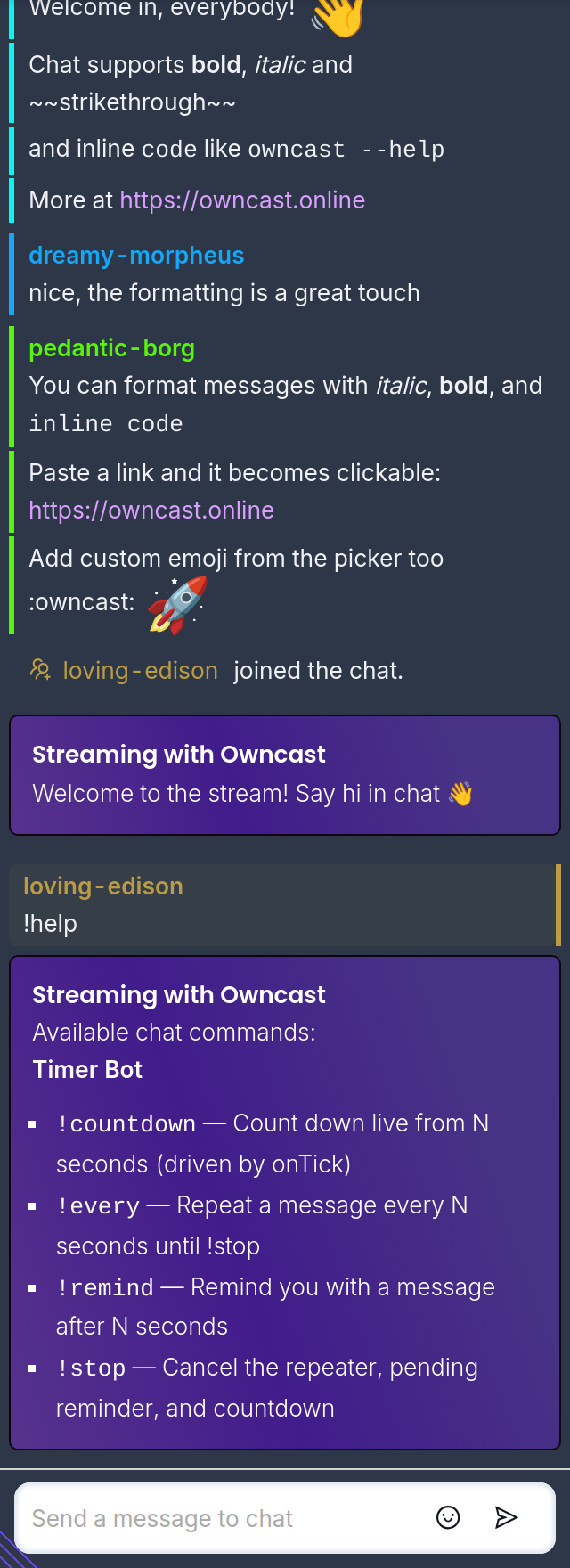
!help is automatic but not reserved
Owncast posts a system message listing command descriptions from every enabled plugin. Moderator-only commands stay hidden from non-moderators. This built-in response needs no plugin permission.
!help and its !commands alias remain ordinary chat messages. Plugins may
also declare or respond to them. The built-in response does not block additional
plugin responses.
Using ordinary chat handlers and filters
A command table is optional. A plugin may inspect msg.body in an
onChatMessage handler for a single fixed command. Hand-rolled commands do not
appear in the built-in help listing.
Command messages remain ordinary chat messages, so a plugin may use both a command table and an ordinary chat handler. Chat filters run before command matching. A message dropped by a filter does not execute any declared command.
Example plugins
- mod-commands (JavaScript, Python): a custom
?prefix with aliases, cooldowns, and moderator gating. - stream-tracker (JavaScript, Python): a command table with
!uptimeand!who, plus stream and chat-user activity tracking. - stream-ops (JavaScript, Python): a command table that reports broadcast and video telemetry.
- timer-bot (JavaScript, Python): a command table for reminders and countdowns (
!remind,!every,!countdown). - ip-bot (JavaScript, Python): a single
!ipcommand answered with the server's public IP. - relay (JavaScript, Python): re-emits
/announce <text>as a broadcast announcement.
Where to go next
- Chat plugins for the chat message payload, sending messages, and filters.
- Handlers reference for the chat events your plugin can subscribe to.
- APIs reference for every
owncast.*method and the permission it needs.
Improve this page
See something missing or incorrect? Edit this page and improve the documentation for everyone.

Related Documents
- Chat pluginsBuild chat bots, moderation tools, and message filters for Owncast plugins using chat handlers and owncast.chat APIs.
- Plugin EventsEvery event your plugin can subscribe to (chat, stream, fediverse, filter, HTTP, and more), with its payload shape.
- Owncast Plugin APIsEvery owncast.* method your plugin can call from inside a handler, what it returns, and what permission it needs.
- ChatHow to use the Owncast chat features.
- Extend Owncast with pluginsWrite plugins that run sandboxed inside Owncast to react to chat, post to the fediverse, serve HTTP endpoints, and add UI.
- Chat is offline