 Owncast now supports custom plugins.
 Plugin Permissions
Every Owncast plugin runs in a sandbox with no implicit access to anything outside the plugin itself. To do useful work (read chat, post to the fediverse, fetch a URL, write to a key-value store) your plugin asks the host through owncast.* methods. Almost every one of those methods is gated by a permission you declare in your manifest. The exceptions are a handful of ambient methods that reach nothing sensitive and need no permission: owncast.log.*, owncast.timer.*, reading your own bundled assets, and owncast.config.get.
Plugins require Owncast 0.3.0 or later.
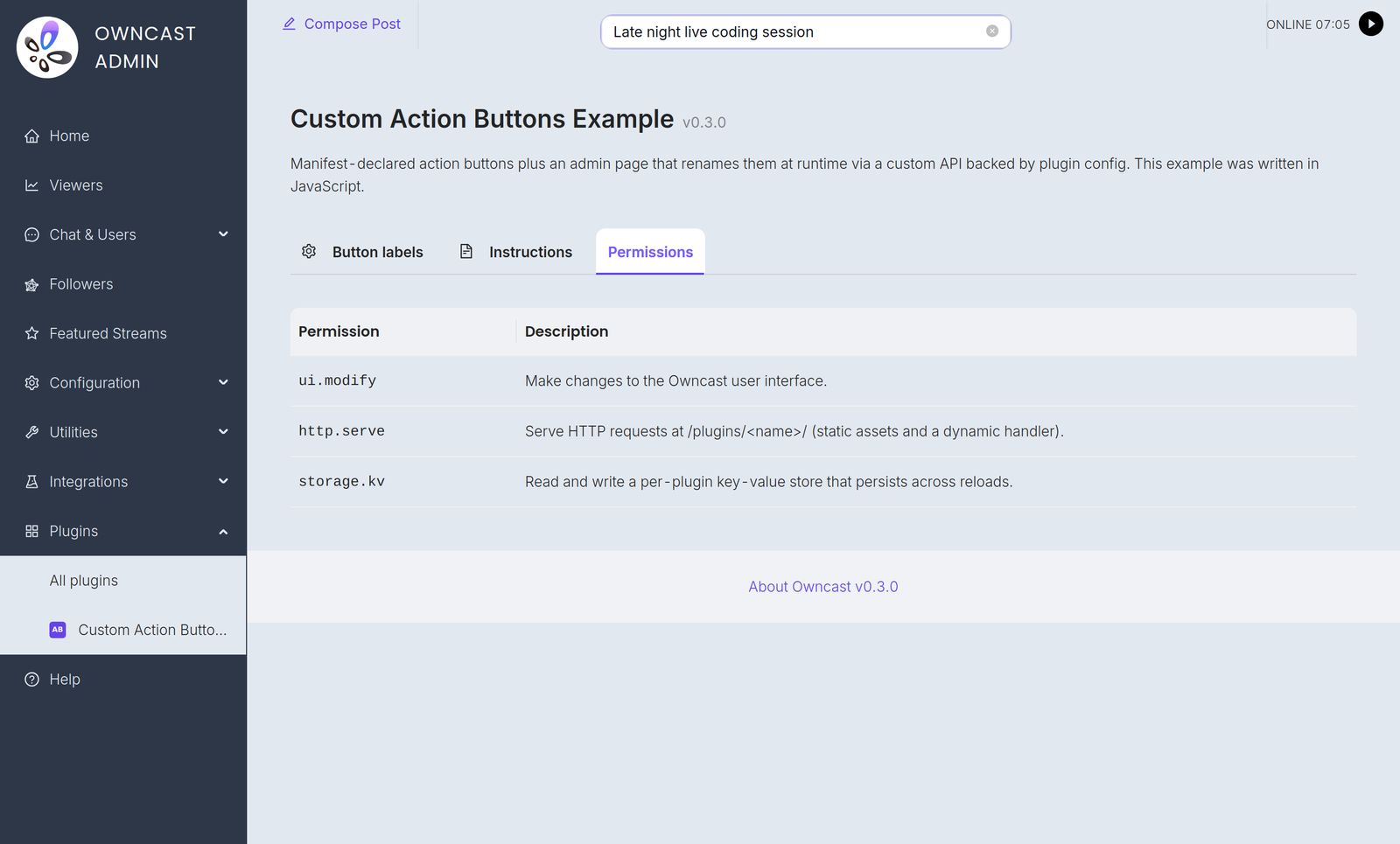
When an admin installs a plugin, the Permissions tab on the plugin's detail page lists exactly what the plugin asked for, in plain language. That's the trust boundary: an admin can install a third-party plugin without auditing every line of code, because the manifest is the upper bound on what the plugin can do.

The permission identifiers and the trust model below are the same regardless of which SDK you use. owncast.* methods are referenced here by their canonical names. For the exact spelling in your language, see the JavaScript or Python SDK reference.
How it works
-
You declare permissions in
plugin.manifest.json:{ "permissions": ["chat.send", "storage.kv"] } -
The admin reviews them when enabling. Owncast's plugin detail page lists each permission with a human-readable description.
-
The host enforces them at runtime. Calling
owncast.chat.send(...)withoutchat.sendin your manifest never reaches Owncast: the host logs the denial and the call does nothing. Mutating calls that report an outcome raise an error (moderation,users.register,auth.grantSession,kv.set,videoConfig.write,actions.add,actions.clear, and everysqlmethod), readers return an empty or zero value, and calls that return nothing become silent no-ops.fs.write,fs.delete, andstorage.uploadreport failure in their return value instead of raising. -
The host catches drift. Your built plugin declares the permissions it uses at runtime. The host compares that against the manifest and refuses to load the plugin if the runtime asks for more than the manifest grants. You can't sneak in extra access by swapping out the plugin file after the fact.
Re-approval when permissions expand
If you ship an update that asks for more permissions than the admin previously approved, the old approved version keeps running (it holds only the approved permissions) and the new package waits as pending. The plugin list shows a "needs re-approval" badge. The admin reviews the new permissions in the Permissions tab and clicks Approve to accept the expanded set and load the update. Shrinking permissions is silent.
An installed plugin's effective capabilities never grow without the admin saying yes again.
Permission reference
chat.send
Grants:
owncast.chat.send(text): post as the plugin's bot identityowncast.chat.sendAction(text): post a "/me" messageowncast.chat.sendTo(clientId, text): private message a connected clientowncast.chat.replyTo(msg, text): whisper a reply back to whoever sent a chat message (sugar oversendTo)owncast.chat.system(body): post a system message with no user identity, rendered as a server announcement (the body is HTML)
Messages go through Owncast's normal chat pipeline (filters, rate limits, persistence, moderation). Plugins cannot send under arbitrary names or impersonate real users.
chat.history
Grants:
owncast.chat.history(limit?): read recent chat messagesowncast.chat.clients(): list connected chat clients
Read-only.
chat.moderate
Grants:
owncast.chat.deleteMessage(messageId): hide a message from viewersowncast.chat.kick(clientId): disconnect a chat client
chat.filter
Grants the ability to define filterChatMessage(msg): see every chat message before it's broadcast, with the ability to rewrite or drop it.
Filtering happens inline on every chat message, so the admin needs to see this called out explicitly. The host rejects the load if a plugin defines filterChatMessage without declaring this permission.
users.read
Grants:
owncast.users.list(): read the chat user listowncast.users.get(id): read a single user record
users.moderate
Grants:
owncast.users.setEnabled(id, enabled, reason?): enable or disable a userowncast.users.banIP(ip): ban an IP from joining chat
users.register
Grants owncast.users.register({ authId, displayName?, scopes?, profileUrl?, handle?, public? }): find or create an authenticated Owncast user for an external identity and return its userId. The authId is a stable, provider-scoped identifier such as "github:583231". Pass it raw, without prefixing your slug. The host records the slug separately and scopes every lookup to that pair, so two plugins cannot collide with or spoof each other's users.
The optional profileUrl, handle, and public fields attach a verified external identity. The profile URL must be empty or an absolute HTTP(S) URL. Set public to true only after the viewer opts into public display. These profile fields are captured on the first registration.
This is how a plugin turns a third-party login (OAuth, Discord, a shared password) into a real Owncast user with an authenticated chat identity. On its own it neither gates the site nor issues a session: pair it with auth.gate to build a login gate, or use it alone to mint verified chat identities.
auth.gate
Grants the viewer-authentication gate:
owncast.auth.grantSession({ userId, ttl? }): issue a signed session for an already-registered user (seeusers.register)owncast.auth.endSession(): clear the current viewer's session (sign-out)- the optional
onAuthCheckhandler: re-validate a viewer's session on each page load
A plugin holding auth.gate is an identity provider. While it is enabled, viewers must authenticate through it before they can reach the page, chat, or the API. The operator selects one cumulative access mode on the plugin's Authentication tab to decide whether Owncast-hosted video and stream status also require a session. Only one auth.gate plugin can be enabled at a time, and the gate fails closed: if the plugin is unavailable, viewers are kept out rather than let in. See Authentication for the full model.
storage.kv
Grants owncast.kv.get(key), owncast.kv.set(key, value), and the JSON helpers owncast.kv.getJSON(key, fallback?) and owncast.kv.setJSON(key, value): a per-plugin namespaced key/value store. Plugins cannot read each other's keys.
State persists across reloads and host restarts.
storage.upload
Grants owncast.storage.upload(name, data): upload a file to Owncast's public file area and get back a URL. Useful for badges, dynamically-generated images, fediverse post attachments.
storage.fs
Grants owncast.fs.*: a private, sandboxed filesystem at data/plugin-storage/<your-slug>/files/ that your plugin can read, write, list, and delete within. Useful for caches, generated data files, append-style logs, or anything you need to persist as real files rather than key/value strings.
Unlike storage.upload, these files stay server-side: they're never served over HTTP. Every path is confined to your plugin's own directory: a plugin cannot read another plugin's files or escape its sandbox (../ and absolute paths are collapsed back inside).
storage.sql
Grants owncast.sql.*: one private SQLite database per plugin, at data/plugin-storage/<your-slug>/db/plugin.db. owncast.sql.exec(sql, params?) runs statements, owncast.sql.query(sql, params?) returns matching rows, and owncast.sql.queryRow(sql, params?) reads a single row. Reach for this instead of storage.kv when you need to sort, filter, or aggregate rather than just remember a value. See owncast.sql.* for the methods in both languages, the per-call limits, and the SQL the host refuses.
The database is private to your plugin and separate from Owncast's own database. The storage.fs sandbox is rooted at files/, so db/ is not a path owncast.fs.* refuses but one it cannot express, and the filesystem quota walk covers files/ only, so the two quotas stay independent: the database has its own 128 MiB cap, and files written through storage.fs count against a separate 256 MiB quota.
Plugin databases are not included in Owncast's database backups, so treat the contents as rebuildable or export what matters yourself. SQL data is retained when a plugin is uninstalled, the same as its config and its storage.fs files, so a reinstall finds its tables where it left them. An admin who wants the space back deletes data/plugin-storage/<your-slug>/.
network.fetch
Grants owncast.http.fetch(url, opts?): synchronous outbound HTTP.
Requires a companion network.allowedHosts list in the manifest. The host rejects the load if network.fetch is granted without an allowlist. Each call is checked against the allowlist. Hosts that don't match return an error before any bytes leave the server.
{
  "permissions": ["network.fetch"],
  "network": { "allowedHosts": ["api.discord.com", "*.weather.com"] }
}
The wildcard "*" is permitted but must be written explicitly so admins reviewing the manifest see the scope. The admin UI surfaces the full allowedHosts list on the Permissions tab next to the network.fetch row, so a server operator reviewing a plugin sees exactly which hosts it can reach without unpacking the .ocpkg.
events.emit
Grants owncast.events.emit(eventType, payload). Pass the receiving plugin's
fully qualified <recipient-slug>.<hook> name. The host does not rewrite the
emitted name. Declaring and receiving a plugin-owned custom hook does not
require a permission.
http.serve
Grants the host's HTTP router permission to send requests at /plugins/<your-slug>/* to your plugin. This covers both static files in your public/ directory and dynamic requests routed to your onHttpRequest handler.
Without this permission, the entire /plugins/<your-slug>/ URL space returns 404.
http.sse
Grants owncast.sse.send(channel, event, data) and exposes a host-owned endpoint at /plugins/<your-slug>/_sse/<channel> that browsers connect to with EventSource. Independent of http.serve. A plugin may push events without serving any other routes.
server.read
Grants the read-only stream and server state APIs:
owncast.stream.current(): live stream stateowncast.stream.broadcaster(): inbound encode telemetryowncast.server.info(): server name, version, summaryowncast.server.socials(): configured social linksowncast.server.emotes(): custom chat emotes configured on this serverowncast.server.federation(): fediverse settingsowncast.server.tags(): configured tags
videoconfig.read
Grants owncast.videoConfig.read(): read the output and transcoding configuration (codecs, latency level, stream variants).
videoconfig.write
Grants owncast.videoConfig.write(partial): modify the video output configuration.
High-trust. Changes apply on the next stream start. The host does not restart an active broadcast. Admins should grant sparingly.
notifications.send
Grants the broadcaster-notification APIs:
owncast.notifications.discord(text): through the streamer's configured Discord webhookowncast.notifications.browserPush({ title, body, url? }): to subscribed browsersowncast.notifications.fediverse({ type, body, image?, link? }): fediverse-formatted notification
fediverse.inbound
Grants subscription to all seven inbound Fediverse plugin events:
fediverse.followfediverse.likefediverse.repostfediverse.quotefediverse.mentionfediverse.replyfediverse.activity
The fediverse.activity catch-all receives the verified activity's raw JSON object. It runs in addition to any matching specialized event. This permission only covers receiving activity. Posting from the Owncast account requires the separate fediverse.post permission.
fediverse.post
Grants owncast.fediverse.post(text): make a public post to the fediverse from the Owncast account.
High-trust: posts go out under the streamer's own fediverse handle and can't be silently revoked. Admins should grant sparingly.
ui.modify
Grants the ability to place UI inside Owncast's own chrome:
- Declaring
manifest.actions(action buttons under the stream). - Calling
owncast.actions.add(...)/.clear()at runtime. - Declaring
manifest.styles(CSS inlined into the viewer page). - Declaring
manifest.scripts(JavaScript inlined into the viewer page). - Declaring
manifest.extraPageContent(an HTML block prepended to the viewer's extra-content area). - Declaring
manifest.tabs(additional tabs in the viewer page's tab row). - Implementing an
onPageStylesoronPageScriptshandler (CSS or JavaScript returned at request time, with no manifest field).
Without this permission, manifests that declare any of those fields are rejected at load. The onPageStyles and onPageScripts handlers have no manifest field, so they aren't rejected at load. The host just doesn't call them unless the plugin holds ui.modify. Each of these reaches into the viewer page rather than staying inside the plugin's own URL space, so the admin needs to see the permission to understand the plugin paints into the host UI.
None of the four viewer-injection fields require http.serve, and neither do the two handlers. The host reads each file from the plugin's assets/ directory (not from a URL), or calls the handler, and inlines the result into the existing config / custom-JS responses, so ui.modify alone is enough.
Summary table
| Permission | Grants |
|---|---|
chat.send | owncast.chat.send, .sendAction, .sendTo, .replyTo, .system |
chat.history | owncast.chat.history, .clients |
chat.moderate | owncast.chat.deleteMessage, .kick |
chat.filter | Subscribe to filterChatMessage (read, modify, or drop every chat message). |
users.read | owncast.users.list, .get |
users.moderate | owncast.users.setEnabled, .banIP |
users.register | owncast.users.register: find-or-create an authenticated user for an external identity |
auth.gate | owncast.auth.grantSession, .endSession, and the onAuthCheck handler: be the site's auth gate |
storage.kv | Per-plugin namespaced key/value store |
storage.upload | Upload files to Owncast's public file area |
storage.fs | Private, sandboxed server-side filesystem at data/plugin-storage/<your-slug>/files/ |
storage.sql | Private per-plugin SQLite database at data/plugin-storage/<your-slug>/db/plugin.db |
network.fetch | Outbound HTTP. Also requires network.allowedHosts |
events.emit | Emit custom events for other plugins |
http.serve | Serve HTTP at /plugins/<your-slug>/* |
http.sse | Push realtime events via owncast.sse.send and the /_sse/ endpoint |
server.read | Read stream state, server config, encode telemetry |
videoconfig.read | Read the output/transcoding config |
videoconfig.write | Modify the video output config (applies on the next stream start) |
notifications.send | Send Discord, browser-push, or fediverse notifications |
fediverse.inbound | Subscribe to all seven inbound events: fediverse.follow, .like, .repost, .quote, .mention, .reply, and .activity |
fediverse.post | Public-post to the fediverse (rate-limited) |
ui.modify | Add action buttons or tabs to Owncast's viewer chrome. Inline plugin CSS, JavaScript, or HTML into the viewer page |
Principle of least privilege
Declare only what you actually use. The narrower your manifest, the easier the admin's trust decision. If you find yourself listing every permission, step back and see if your plugin should really be two plugins.
If you stop using a permission during development, drop it from the manifest. Shrinking is silent. There's no friction in removing unused entries.
Improve this page
See something missing or incorrect? Edit this page and improve the documentation for everyone.
 Gabe Kangas
Related Documents
- Owncast Plugin APIsEvery owncast.* method your plugin can call from inside a handler, what it returns, and what permission it needs.
- Plugin quickstartScaffold a new Owncast plugin in JavaScript or Python, build it, package it, and install it on your server.
- Plugin EventsEvery event your plugin can subscribe to (chat, stream, fediverse, filter, HTTP, and more), with its payload shape.
- Plugin Manifest referenceEvery field your plugin's manifest can contain, with examples.
- Python SDKAuthor Owncast plugins in Python with owncast-plugin-py: install, the @plugin decorators, the owncast-plugin-py CLI, and testing.
- Chat plugin commandsDeclare chat commands with aliases, cooldowns, moderator gating, and automatic !help listings.