 Owncast now supports custom plugins.
 Owncast Social Features
Owncast allows people to follow, engage with, and share your stream with others on what is known as The Fediverse, a decentralized network of services.
What it supports
- People can follow your server.
- Your followers show up in the "Followers" tab on your stream's page. You can hide this tab if you prefer.
- You can send out posts to your followers via the admin.
- Your followers will automatically get notified when you go live.
- Your followers can share that you've gone live with their circle of followers.
- Actions such as following, liking or sharing get exposed within your stream's chat.
Why use Owncast's social features?
Own Your Audience
Unlike traditional streaming platforms, there's no risk of algorithm changes hiding your content, sudden platform policy shifts, or losing access to your community. Your followers are yours.
Reach Beyond Your Site
Your stream becomes discoverable across the entire Fediverse network. Millions of users on Mastodon, Pixelfed, and other federated platforms. When your followers share that you're live, it spreads organically across their networks without algorithms gatekeeping your reach.
No Extra Accounts Needed
Your audience doesn't need to create yet another account on yet another platform. If they're already using any Fediverse service like Mastodon or Pleroma, they can follow your Owncast server with their existing account.
Direct Communication
Send updates directly to your followers about upcoming streams, special events, or important announcements. No competing with millions of other creators in an algorithmic feed, your followers see your posts chronologically where they already are.
Community Building
Engagement from the Fediverse (follows, likes, shares) appears directly in your stream's chat, creating excitement and social proof. Your followers and shares are featured in front of everyone, making them feel valued as part of your community and encouraging others to share and follow as well.
FediAuth
Enabling FediAuth allows your viewers to authenticate using their Fediverse accounts when participating in chat. This helps maintain a consistent chat presence across sessions, browsers, and devices. This is especially useful for moderators.
How do people follow your Owncast server?
Any person on the Fediverse using a service that is compatible with following Owncast, such as Pleroma or Mastodon can follow your server.
Learn more about The Fediverse.
How it works
The Fediverse is an ensemble of decentralized and interconnected servers that are used for social networking, microblogging and more. While each server is independently hosted, they communicate with each other.
Each Owncast instance operates as a completely standalone server with a single user that can take part in the Fediverse, exchanging posts and notifications with any participating user who is interested in them.
Any user on the Fediverse that is on a compatible server can follow any Owncast server that has this feature enabled.
Enabling social features
Social features are disabled by default. To enable them on your Owncast server visit the Configuration -> Social page.
Requirements
You must be hosting your Owncast server behind SSL, with a https URL. Set up a HTTP Proxy if needed.
Configuration
Visit the Configuration -> Social page to configure.
- You can set the username that you're seen as.
- You can set the "Now Live" message that is sent out each time you go live. Go-live posts are only sent when this message is set, so leave it blank to disable them.
- You can toggle "Private mode".
- You can mark your server as potentially NSFW so previews of your stream are flagged as sensitive.
- You can toggle "Show engagement" to control whether follows, likes and shares appear in your chat feed.
- You can toggle "Allow quotes" to control whether people can quote your posts.
- You can toggle "Hide followers" to remove the public Followers tab from your stream page. Social features stay enabled.
- You can list blocked domains to stop specific servers from interacting with yours.
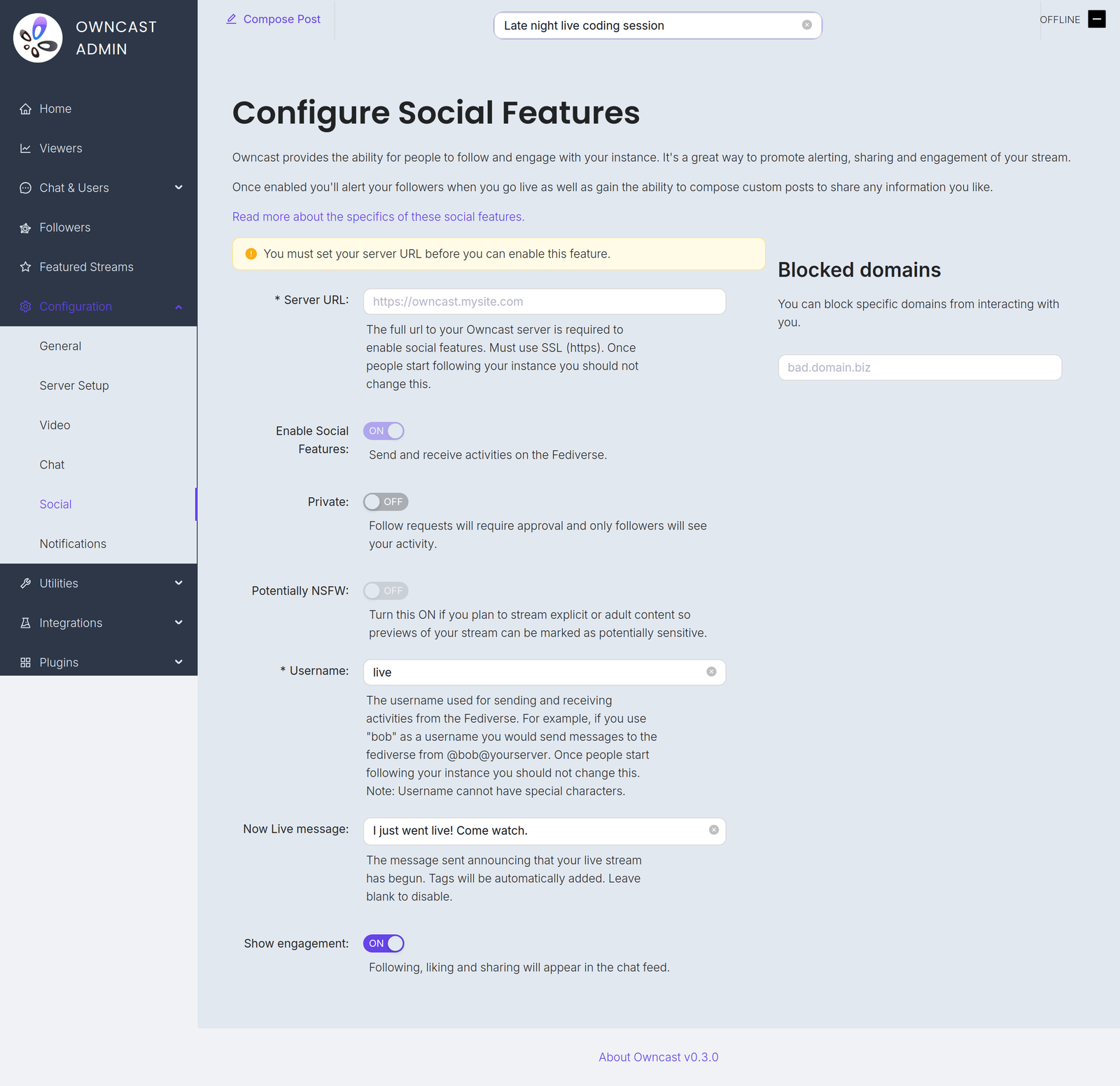
Once you set your server name and your username that's how people will see you. If you change either of those two settings you'll show up as a different user and your existing followers may no longer be following you. It is not suggested you change these after you set them.
Private mode
Enabling Private Mode will require those who wish to follow your server to be approved by you first. Approving followers can be done via the Followers section in the admin.
Private Mode will also make it so any posts you send out are only visible to your followers, not others, as they cannot be shared.
Managing followers
The Followers section of the admin lists your current, pending, and blocked followers. With Private Mode on, new follow requests wait there until you approve or reject them. For existing followers you can choose between Remove, which lets them follow you again later, and Block, which prevents them from following you again.
Quote posts
Quote post support was added in Owncast 0.3.0.
People on Mastodon, GoToSocial and other platforms that support quote posts can quote your posts in their own, adding their commentary while showing your original post to their followers. Owncast approves these quotes automatically using the consent flow the Fediverse uses, so quotes of your posts show up correctly everywhere.
If you would rather not allow this, turn off Allow quotes on the Configuration -> Social page. New posts will no longer offer quoting and any quote requests will be declined. Posts are also not quotable while Private Mode is enabled, since they are only visible to your followers.
Composing messages to your followers
By clicking the Compose button in the admin header you can create a post to send to your followers. This could be used to tell people when you plan on streaming, or to remind people that you're still live. Posts are limited to 500 characters and support simple Markdown formatting. Hashtags are turned into links to their tag pages.
Engagement
If somebody follows you, likes a post you send out, or shares any of your posts while a stream is live it will display that these actions took place within the chat feed. This can be disabled under the social settings.
Fediverse follow events are also available to third-party integrations through webhooks.
Improve this page
See something missing or incorrect? Edit this page and improve the documentation for everyone.


Related Documents
- The FediverseAllow people to follow your server, know when you go live, share and interact with your stream.
- Enable Chat authenticationVerify and keep your chat identity.
- Featured StreamsFeature other Owncast streams on your server so visitors can discover them, and have your own stream featured on other servers.
- AuthenticationBuild a plugin that makes viewers sign in with OAuth, a password, or any HTTP-based provider before they can reach protected Owncast resources.
- ActivityPub & The Fediverse ProtocolA protocol-level reference for the ActivityPub activities Owncast sends and receives, so you can build a Fediverse application that interoperates with Owncast servers.
- Live stream notificationsSend notifications when your stream goes live.