Owncast v0.0.4

· 2 min read

v0.0.4 includes several small updates and bug fixes. Also, you can now set a custom RTMP port and use our prepared builds for ARM computers like the Raspberry PI. With our notification feature, your visitors can see that a stream has started and that new chat messages were written while they were in other tabs.

Upgrade instructions from 0.0.3

  1. Stop the service from running.
  2. Backup your config.yaml and any other files you may have customized and want to save or refer to later.
  3. Move the zip file of 0.0.4 to your previous install location.
  4. Unzip the file, allowing it to overwrite old files.
  5. Restart the service.

Changelog

Owncast Core:

  • Feat: Add build support for ARM computers like the Raspberry PI.
  • Feat: Add option to change the port of the RTMP server.
  • Feat: Add sanity check for ffmpeg when launching Owncast.

Web Interface:

  • Fix: Show a more detailed error message if websocket cannot connect.
  • Fix: Layout of tags if there are too many for the width of the window.
  • Fix: Problem where in some rare cases the player can get into an infinite loop trying to update the HLS playlist.
  • Feat: Hide viewer count when offline.
  • Feat: Display notification in the title if a message comes in or a stream starts and you've navigated away.
  • Fix: Rename social icons Javascript file so uBlock Origin doesn't block it.

Admin Interface:

  • Fix: Remove possible duplicate rows in viewer table.
  • Fix: The wrong month may be displayed in the admin viewers graph.
  • Fix: Case where old users may continue to show up in admin viewers table after they are gone.

Breaking changes

There have been no breaking changes in this release.

APIs

There are no api changes in this version. You can find the complete set of APIs by visiting the API documentation.

API Documentation

Owncast v0.0.3

· 3 min read

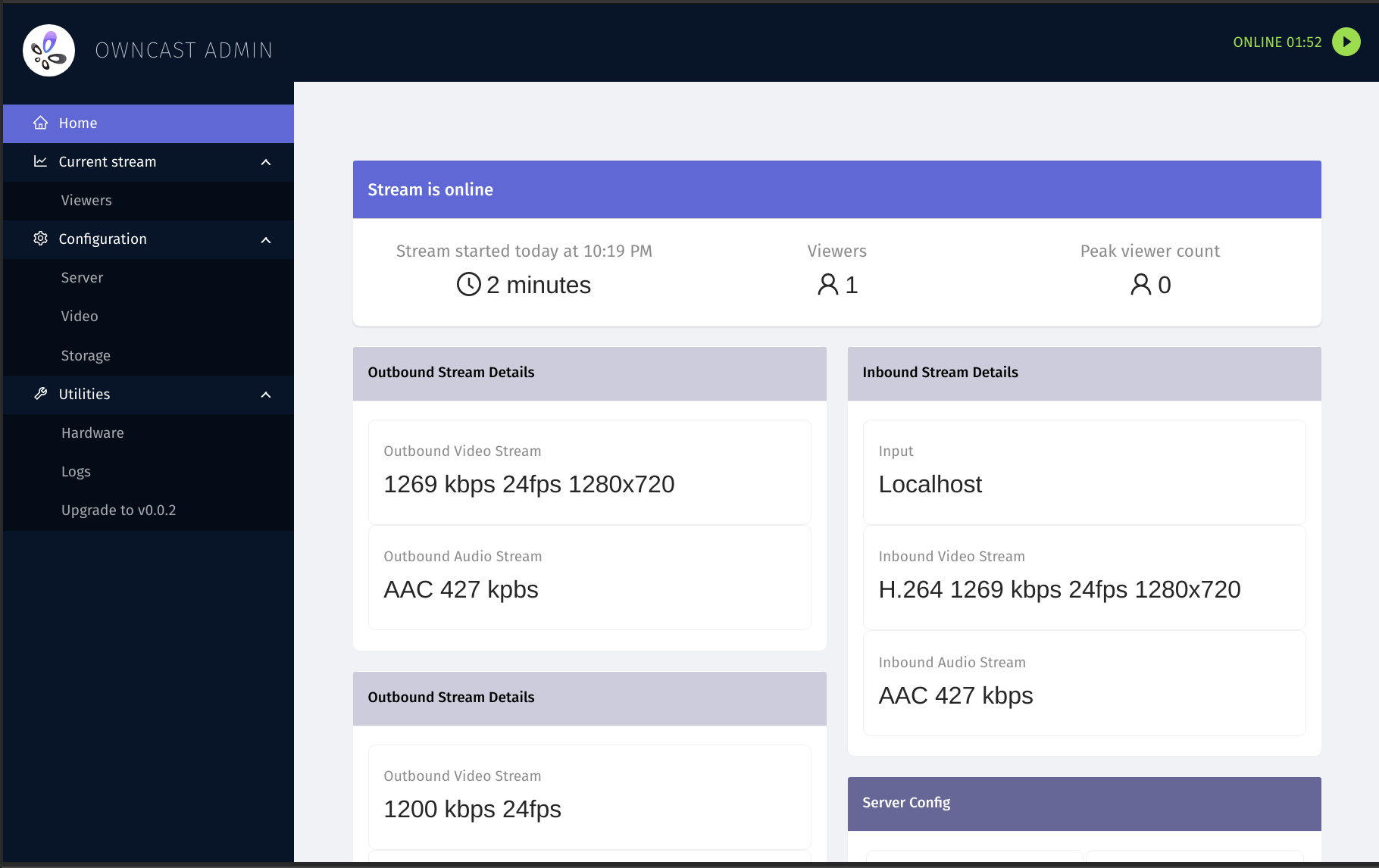
v0.0.3 has a new admin dashboard to help get an overview of the configuration and performance of your Owncast server along with handfuls of additional updates.

Owncast Admin

v0.0.3 introduces the web admin dashboard that you can use to get an overview of your owncast server.

Visit /admin and login with admin as the username and your stream key as the password.

We will continue to add functionality to this over time, so please let us know how it works for you and if you have any feedback.

Upgrade instructions from 0.0.2

  1. Stop the service from running.
  2. Backup your config.yaml and any other files you may have customized and want to save or refer to later.
  3. Move the zip file of 0.0.3 to your previous install location.
  4. Unzip the file, allowing it to overwrite old files.
  5. Edit your config.yaml file and change the logo entry to be a single item, no longer a small and large. If you're using the default then it should look like the following: logo: /img/logo.svg. Take note the old logo images have been changed to logo.svg.
  6. Move the stats.json file to data.
  7. Move your content.md file to data if you have one.
  8. Restart the service.

Breaking changes

  • How your logo is set in the config file has changed. See upgrade instructions.
  • chat.db has been renamed to owncast.db and moved to the data directory. You should delete your old chat.db file.
  • content.md has moved to to /data.
  • stats.json has moved to /data.
  • Optional chatDatabase command line flag is moved to database. chatDatabaseFile in config changed to databaseFile.

Changelog

  • Fixes for possible bugs in username highlighting in chat.
  • Logo requirements have been simplified to only require a single logo to be specified in the config.
  • Viewer counts are now limited to the number of people viewing from the owncast web interface.
  • Stream length can now specify "days".
  • Fix for the video thumbnail flickering as it updates.
  • Placing a copy of ffmpeg into the same directory as owncast will now use that copy.
  • Updated chat message design with removed avatars.
  • Removed need for client-side markdown parsing.
  • Fix for an exception being thrown when zero socialHandles are supplied.
  • Video player volume is now saved when changing it.
  • The web app Javascript assets are no longer being pulled from a remote CDN.
  • Fix for video getting cut off on Firefox.
  • Large play button is re-displayed when the video player is paused.
  • Seek bar has been removed from the player.
  • Fix for crash when some RTMP sources send unexpected payloads.
  • An internal refactor of the video pipeline.
  • offlineContent is no longer specified in the config file.

APIs

This release added some basic read-only APIs for use in the new admin dashboards. They are authenticated against your stream key just like the admin site is.

You can find the complete set of APIs by visiting the API documentation.

API Documentation

Owncast v0.0.3

· 3 min read

v0.0.3 has a new admin dashboard to help get an overview of the configuration and performance of your Owncast server along with handfuls of additional updates.

Owncast Admin

v0.0.3 introduces the web admin dashboard that you can use to get an overview of your owncast server.

Visit /admin and login with admin as the username and your stream key as the password.

We will continue to add functionality to this over time, so please let us know how it works for you and if you have any feedback.

Upgrade instructions from 0.0.2

  1. Stop the service from running.
  2. Backup your config.yaml and any other files you may have customized and want to save or refer to later.
  3. Move the zip file of 0.0.3 to your previous install location.
  4. Unzip the file, allowing it to overwrite old files.
  5. Edit your config.yaml file and change the logo entry to be a single item, no longer a small and large. If you're using the default then it should look like the following: logo: /img/logo.svg. Take note the old logo images have been changed to logo.svg.
  6. Move the stats.json file to data.
  7. Move your content.md file to data if you have one.
  8. Restart the service.

Breaking changes

  • How your logo is set in the config file has changed. See upgrade instructions.
  • chat.db has been renamed to owncast.db and moved to the data directory. You should delete your old chat.db file.
  • content.md has moved to to /data.
  • stats.json has moved to /data.
  • Optional chatDatabase command line flag is moved to database. chatDatabaseFile in config changed to databaseFile.

Changelog

  • Fixes for possible bugs in username highlighting in chat.
  • Logo requirements have been simplified to only require a single logo to be specified in the config.
  • Viewer counts are now limited to the number of people viewing from the owncast web interface.
  • Stream length can now specify "days".
  • Fix for the video thumbnail flickering as it updates.
  • Placing a copy of ffmpeg into the same directory as owncast will now use that copy.
  • Updated chat message design with removed avatars.
  • Removed need for client-side markdown parsing.
  • Fix for an exception being thrown when zero socialHandles are supplied.
  • Video player volume is now saved when changing it.
  • The web app Javascript assets are no longer being pulled from a remote CDN.
  • Fix for video getting cut off on Firefox.
  • Large play button is re-displayed when the video player is paused.
  • Seek bar has been removed from the player.
  • Fix for crash when some RTMP sources send unexpected payloads.
  • An internal refactor of the video pipeline.
  • offlineContent is no longer specified in the config file.

APIs

This release added some basic read-only APIs for use in the new admin dashboards. They are authenticated against your stream key just like the admin site is.

You can find the complete set of APIs by visiting the API documentation.

API Documentation

Owncast v0.0.2

· 2 min read

v0.0.2 has a bunch of updates, mostly focused on the web frontend.

Major changes

  • Rewrite of the web interface with Preact, removing Vue.
  • Add support for embedding chat externally.
  • Add support for embedding the video player externally.
  • Your username will get highlighted in chat when mentioned.
  • Emoji picker w/ custom emoji support.
  • Autocomplete usernames in composing chat messages by hitting tab.
  • Improve support for autolinking, and embedding YouTube or Instagram links in chat.
  • Server alerts to the console when there is excessive hardware utilization.
  • Updated version of Video.js and associated http-streaming library.
  • Improve max bitrate compatibility with HLS spec.
  • Stop jumping to bottom of chat when scrolling and reading previous messages.
  • Username colors are tweaked to be easier to read.
  • Improved mobile layout in the web UI.
  • Remove Cache-Control header when sending to external S3 storage to support Digital Ocean Spaces.
  • Stream gets cleaned up after 5 minutes of being disconnected.

Visit the documentation to read more about how to take advantage of embedding and custom emoji.

You can get the release from GitHub or on Docker Hub.

Upgrading from v0.0.1

This release has a rewrite of the web frontend, so any customization you made previously will need to be re-applied to this new web app. The simplest way to upgrade is just overwrite the old version with the new version, but it won't delete any old files that are no longer used.

However, you're free to upgrade any way you like, but make sure your chat.db, config.yaml, webroot/static/content.md and stats.json files are saved.

  1. Stop the service from running.
  2. Move the zip file of 0.0.2 to your previous install location.
  3. Unzip the file, allowing it to overwrite old files.
  4. Restart the service.

Owncast v0.0.2

· 2 min read

v0.0.2 has a bunch of updates, mostly focused on the web frontend.

Major changes

  • Rewrite of the web interface with Preact, removing Vue.
  • Add support for embedding chat externally.
  • Add support for embedding the video player externally.
  • Your username will get highlighted in chat when mentioned.
  • Emoji picker w/ custom emoji support.
  • Autocomplete usernames in composing chat messages by hitting tab.
  • Improve support for autolinking, and embedding YouTube or Instagram links in chat.
  • Server alerts to the console when there is excessive hardware utilization.
  • Updated version of Video.js and associated http-streaming library.
  • Improve max bitrate compatibility with HLS spec.
  • Stop jumping to bottom of chat when scrolling and reading previous messages.
  • Username colors are tweaked to be easier to read.
  • Improved mobile layout in the web UI.
  • Remove Cache-Control header when sending to external S3 storage to support Digital Ocean Spaces.
  • Stream gets cleaned up after 5 minutes of being disconnected.

Visit the documentation to read more about how to take advantage of embedding and custom emoji.

You can get the release from GitHub or on Docker Hub.

Upgrading from v0.0.1

This release has a rewrite of the web frontend, so any customization you made previously will need to be re-applied to this new web app. The simplest way to upgrade is just overwrite the old version with the new version, but it won't delete any old files that are no longer used.

However, you're free to upgrade any way you like, but make sure your chat.db, config.yaml, webroot/static/content.md and stats.json files are saved.

  1. Stop the service from running.
  2. Move the zip file of 0.0.2 to your previous install location.
  3. Unzip the file, allowing it to overwrite old files.
  4. Restart the service.

Owncast v0.0.1

· One min read

In honor of @mattdsteele and @JCake live streaming their wedding using Owncast tomorrow, here's the first release version.

We've been testing, doing events and enjoying using Owncast, so I think it's time to have a release version that others can start using as well.

Still lots of exciting updates going on, but here's finally something that you can start using. Feel free to reach out and let us know what you're using Owncast for, or if you have any questions.

This release is also on Dockerhub if that's convinient for you.

docker pull gabekangas/owncast:0.0.1

image

On Dockerhub

Congratulations Matt and Jessica!


Downloads

View all downloads on the GitHub release page.

PlatformDownload
owncast-linux-0.0.1.zipDownload (9.5 MB)
owncast-macOS-0.0.1.zipDownload (10.0 MB)